
AI video analytics for public safety is software that analyzes live or recorded video from existing cameras to surface events, objects, vehicles, and behaviors for human review. It supports faster investigations, real-time alerts, and historical video search while keeping people in the loop on every decision that affects a person.
Public safety agencies already manage large volumes of video — from city cameras at intersections and parks, building cameras at schools and government facilities, transit-corridor cameras, and shared deployments at public events. The operational bottleneck is not video collection. It is locating the relevant camera, time window, object, vehicle, or event quickly enough for an operator or investigator to act.
The goal is to help police, RTCC, city IT, and procurement teams evaluate AI video analytics as an operational system — not just a detection feature.
What AI video analytics for public safety means
AI video analytics for public safety is software that analyzes live or recorded video and produces structured outputs — detections, search results, event timelines, review queues, alerts, and evidence packages — that human reviewers act on. The analytics layer reads accessible video streams from existing CCTV cameras and recording systems, applies trained models to identify objects, vehicles, attributes, or defined behavior patterns, and returns results into operator workflows.
In practice, an analyst can search recorded footage across many cameras; an operator can receive a real-time alert when a defined condition occurs in a monitored zone; and an investigator can assemble an evidence package with time stamps, source cameras, and chain-of-custody documentation. The underlying cameras stay where they are. The analytics is added as an intelligence layer over the existing video network.
What it is not
Public-sector buyers should be clear about the boundaries of AI video analytics:
- It is not a replacement for officers, analysts, investigators, or supervisors. Every action that affects a person should sit with a person
- It is not a guarantee that every camera in the inventory can support every analytic — camera placement, resolution, framerate, lighting, and stream access all determine what is feasible
- It is not a policy by itself. How the platform is permitted to be used — by whom, for what purpose, on what record — comes from the agency’s own policy and applicable law
- It is not useful without governance. Without audit logs, role-based access control, and review workflows, even strong detection capabilities become difficult to defend on the procurement record or during oversight reviews
Core public safety use cases
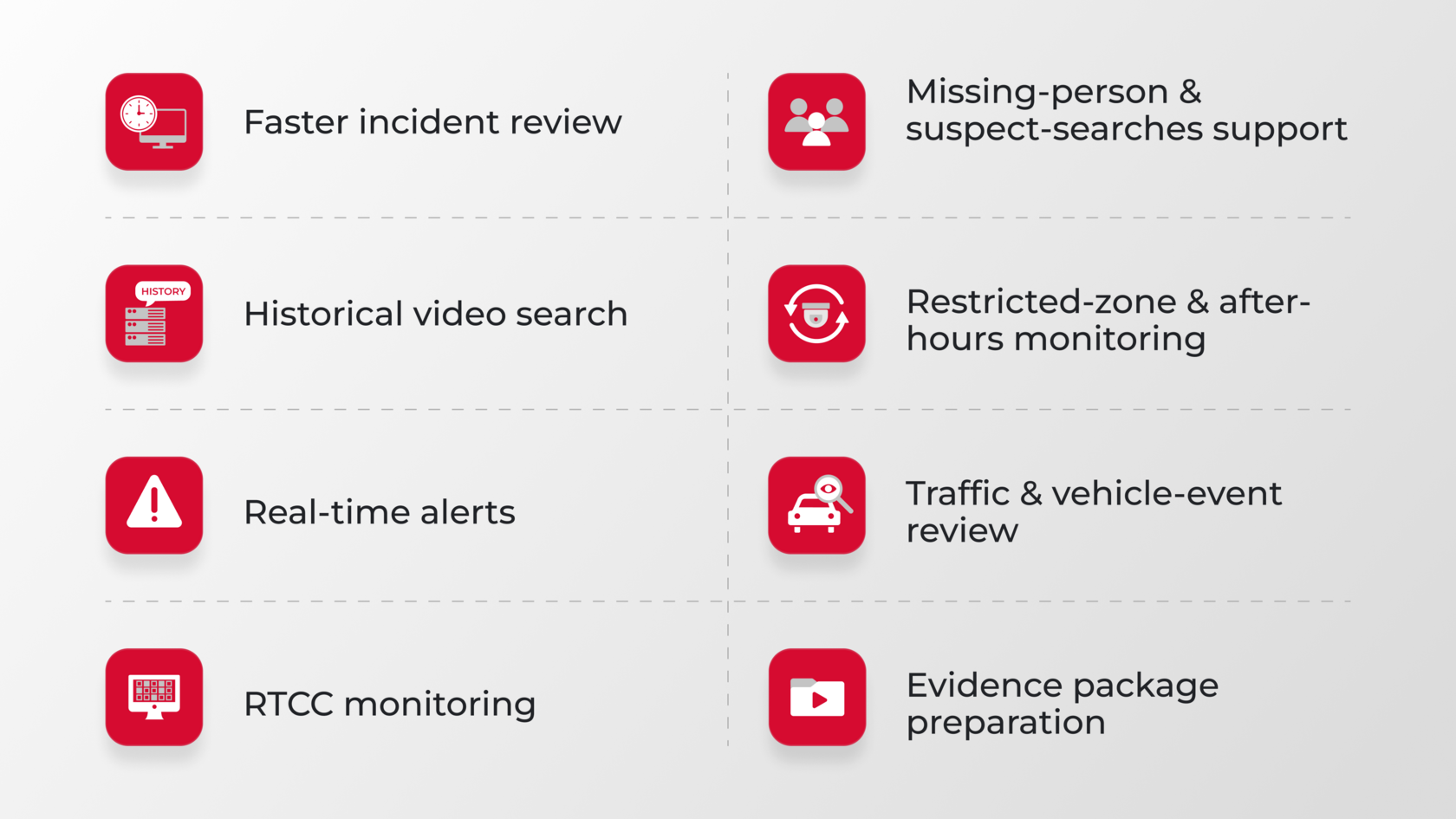
For police departments, sheriff offices, RTCCs, and city operations teams, AI video analytics on existing cameras typically supports work that is already happening, just faster and more reviewable:
- Faster incident review — operators can narrow time-bounded camera review without manually scrubbing every feed
- Historical video search — investigators search recorded footage by object, vehicle, or appearance characteristic and review candidate results before drawing conclusions
- Real-time alerts — defined operational conditions, such as a vehicle of interest entering a monitored zone, route to the right operator for review and escalation
- RTCC monitoring — analysts work across many cameras with a single search interface instead of switching between siloed VMS instances
- Missing-person and suspect-search support — analytics narrow the footage an investigator needs to watch; investigators make determinations
- Restricted-zone and after-hours monitoring — alerts on defined zone-and-time rules, with operator confirmation before any action
- Traffic and vehicle-event review — plate-of-interest review and intersection event review, where camera angle and resolution support it
- Evidence package preparation — clip extraction, time stamps, source-camera identification, and chain-of-custody documentation
In every case, a person remains in the loop. AI narrows what humans look at; it does not decide what the response should be.
How AI video analytics works with existing infrastructure
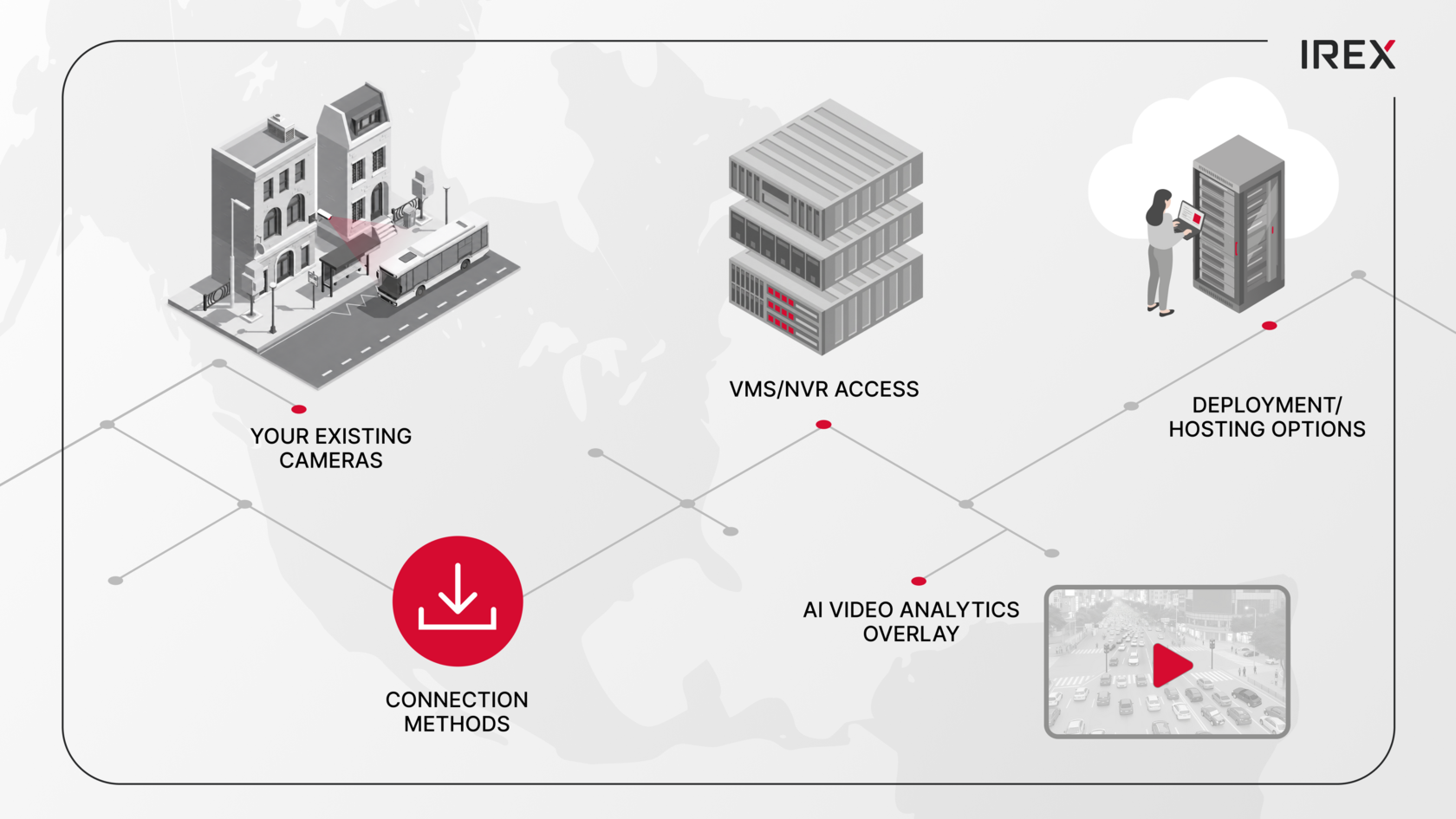
AI video analytics typically deploys as an overlay over existing cameras and recording systems. The starting point is the agency’s current camera inventory.
- Existing CCTV cameras — IP cameras that expose accessible video streams, including most current-generation models
- ONVIF and RTSP compatibility — the analytics platform reads live streams or pulls archived footage through standard protocols, where supported by the camera and VMS
- VMS / NVR access — many modern VMS environments can support authenticated stream or archive access, depending on configuration, licensing, and integration options; some proprietary or end-of-life systems may require additional steps
- Archived footage — historical search depends on the agency’s retention window
- Camera inventory and stream quality — resolution, framerate, lighting, and placement determine which analytics are feasible on which cameras
- Hosting — deployments can run on-premises, in private cloud, or at the edge, depending on the agency’s security architecture
Whether any specific stream qualifies depends on camera model, stream quality, network conditions, VMS access, and deployment architecture. Not every camera will support every analytic — that is a normal outcome of a compatibility review, not a deal-breaker.
AI video analytics vs traditional video monitoring
Public-sector teams often ask how AI video analytics differs from the live-monitoring workflows they already operate. The table below summarizes the operational difference, not a marketing comparison.
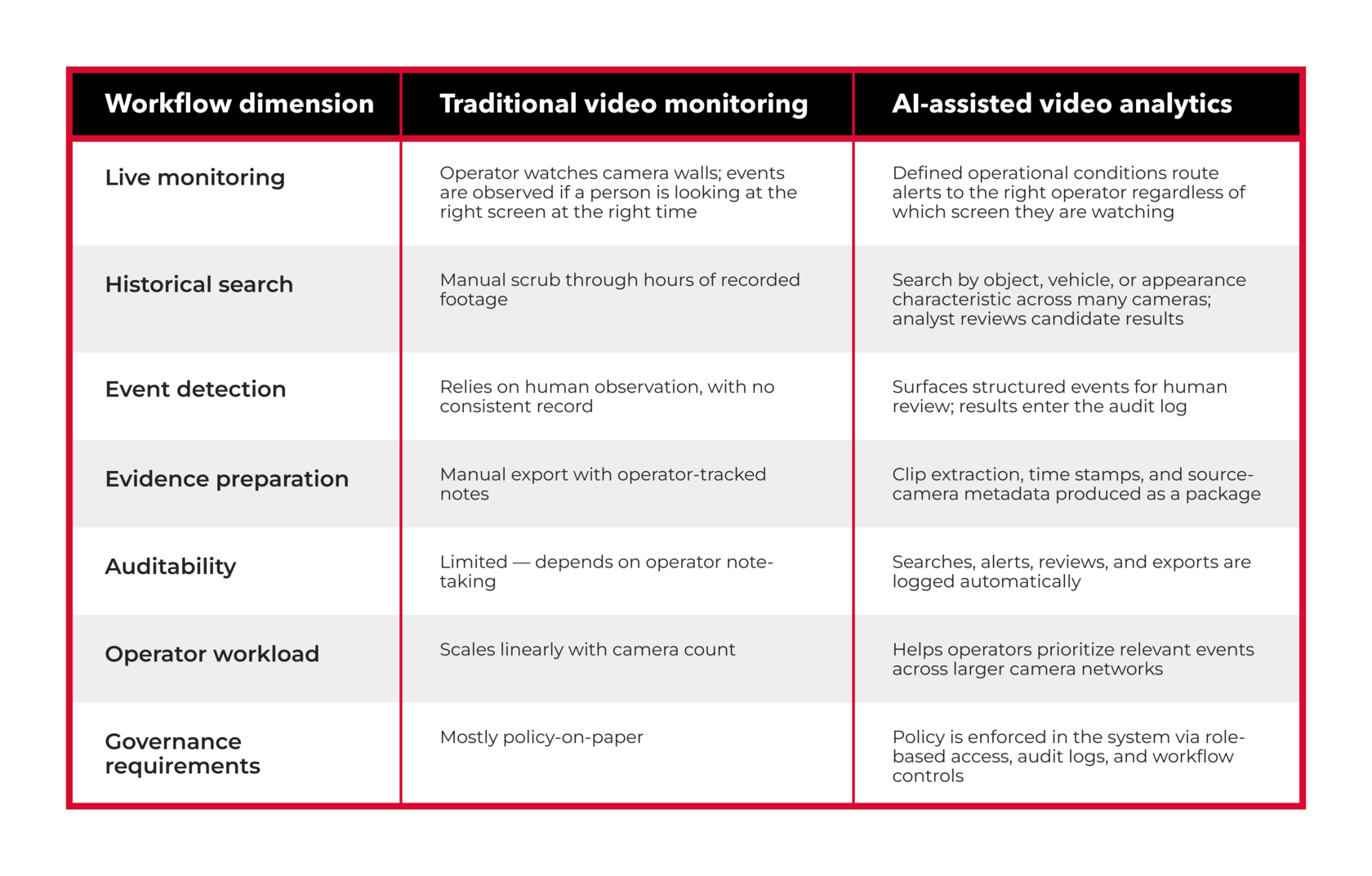
Most agencies will still use live monitoring for situational awareness. The analytics layer adds search, alert routing, and auditability where manual monitoring alone is too slow or too difficult to document.
What public-sector CIOs and IT teams should evaluate
Before scoping a deployment, IT and security reviewers should baseline a short list:
- Camera access — number and type of cameras, by location, with stream and credential availability
- Stream quality — resolution and framerate against the analytics the agency wants to enable
- VMS / NVR integration — whether the analytics platform can authenticate against the recording environment
- Archive access — retention window and the ability to pull historical footage for investigation
- Bandwidth — between cameras, recorders, and the analytics processing location
- Hosting model — cloud, private cloud, on-premises, or edge, and the trade-offs for each
- Cybersecurity review — alignment with the agency’s network segmentation, identity, and security architecture
- User permissions — who can search, alert, export, and edit watchlists
- Audit logs — what the platform records about operator actions, search history, alerts, and exports
- Retention and export policies — how long audit logs are kept and how exports are controlled
This checklist feeds directly into the RFP.
Governance-first AI: why audit logs and RBAC matter
For public-sector deployments, detection capability is only one part of the evaluation. Agencies also need to prove who used the system, what they searched, what they exported, and whether each action followed policy. A defensible deployment plans for:
- Audit logs that capture every search, every alert reviewed, every export, and the operator behind each action — usable evidence for oversight reviews and public-records requests
- Role-based access control so operators see only what their assignment allows, with separation between investigators, supervisors, and administrators
- Human-in-the-loop review on any action that affects a person — AI surfaces candidates; people make decisions
- Policy-based workflows that document which analytics are permitted, under what conditions, and with what approval
- Search and export records that survive personnel changes and become part of the investigative trail
- Oversight and public trust — transparency on what the platform does, what it cannot do, and what the agency has chosen not to enable
Searches, exports, and investigative actions can also be associated with a Case ID, helping agencies connect video activity to a specific investigation, request, or operational workflow.
For public-sector deployments, these controls should be treated as baseline requirements, not afterthoughts.
Where Searchveillance™ fits
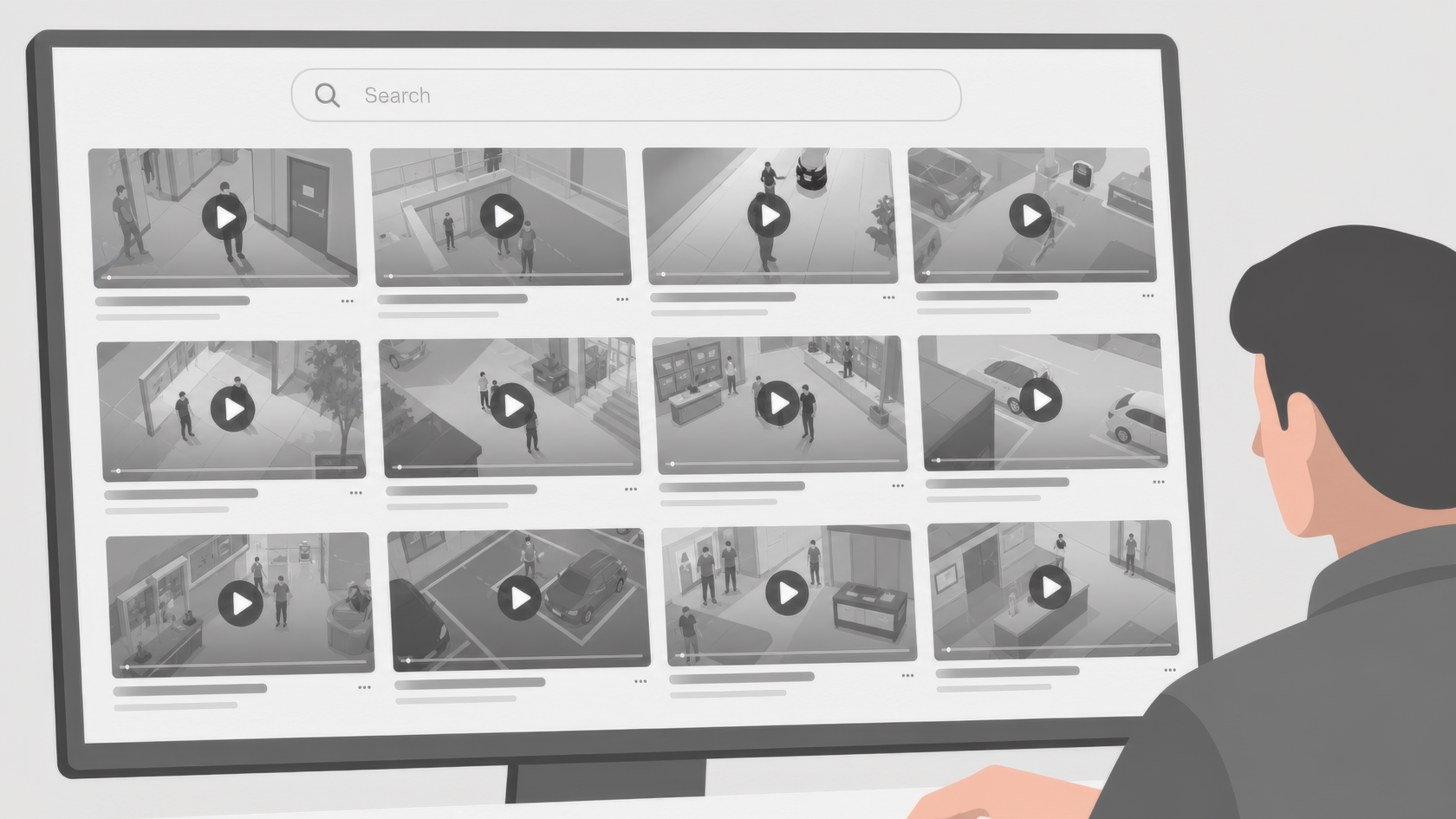
Searchveillance™ is IREX’s video search and investigation capability for recorded video and live event streams. It helps authorized users search across video sources, review relevant events, and support investigations through a controlled workflow.
In day-to-day operations, Searchveillance™ lets an analyst search recorded footage by object, vehicle, or appearance description and review candidate results inside the same workflow that captures the audit record. For real-time operations, it surfaces defined conditions for operator review and routes alerts through controlled workflows.
Whether Searchveillance™ fits a specific environment depends on camera model, stream quality, network conditions, VMS access, and deployment architecture. The starting point for most agencies is a short compatibility review against the existing inventory, not a pilot that begins with new hardware.
Questions agencies should ask before procurement
Public-sector buyers should put the following questions in writing before signing a contract:
- What camera and VMS environments are supported, including specific models and firmware?
- Can the system search historical footage from our existing recording environment, and how far back?
- How is every search logged, and how long are search logs retained?
- How are exports controlled, watermarked, or restricted by role?
- What roles and permissions are available, and can they be limited by case, district, or use case?
- What happens when a model’s confidence is low — does the platform suppress, surface for review, or escalate?
- Can specific analytics be enabled, disabled, or restricted by policy or use case?
- What deployment models are supported — on-premises, private cloud, agency-controlled cloud, or edge?
- What proof is available for capability claims, and what references or validation materials can be shared under the appropriate approval or NDA process?
- What in the proposal requires legal or security review before procurement can advance?
Clear answers turn the vendor discussion into a procurement record: supported systems, permitted use cases, logging requirements, deployment model, and proof of claims.
What this guide does not cover
This guide is a public-sector decision aid. It deliberately does not cover:
- Not legal advice — public-records, biometric-data, and surveillance laws differ by state and locality; the agency’s legal counsel should advise on specifics
- Not a statute-by-statute policy guide — agency policy is the right place for use-case rules, not a vendor guide
- Not an accuracy benchmark — detection performance is environment-specific and should be evaluated on the agency’s own footage, not on vendor marketing
- Not a claim that every camera works — feasibility depends on camera model, stream quality, network conditions, VMS access, and deployment architecture
- Not a competitor comparison — that belongs in an agency-specific evaluation, not a general guide
- Not a substitute for agency-specific security review — the agency’s existing security architecture and procurement rules apply
For any of the above, the appropriate path is an agency-specific conversation with the relevant function — legal, IT/security, procurement, or the vendor.
Governance considerations and oversight practices for public-sector AI are covered in more detail in IREX’s Ethical AI framework.
Conclusion
AI video analytics can help public safety teams make existing video more searchable, more reviewable, and more auditable — but only when it is deployed against clear use cases, with governance controls the agency can defend, and against an honest review of the existing camera inventory and VMS/NVR access. The detection model alone is not the hard part. The deployment record is.
A practical starting point is a short compatibility and governance review against the existing inventory.
Request a 30-minute public safety video analytics review with IREX
IREX can help your team review existing cameras, VMS/NVR access, search needs, alert workflows, audit requirements, and deployment options before you scope a pilot or RFP. Book a time with our team.
FAQ
What is AI video analytics for public safety?
AI video analytics for public safety is software that analyzes live or recorded video from existing cameras to surface events, objects, vehicles, and behaviors for human review. It supports faster investigations, real-time alerts, and historical video search while keeping people in the loop on decisions that affect a person.
Can AI video analytics work with existing CCTV cameras?
Often yes — provided the cameras expose accessible streams (commonly ONVIF or RTSP) and image quality supports the specific analytic. Whether a given camera qualifies depends on camera model, stream quality, network conditions, VMS access, and deployment architecture. Some older cameras work without modification; others may need targeted upgrades for specific use cases.
Is AI video analytics only for real-time alerts?
No. Real-time alerting is one use case. Historical video search, evidence package preparation, post-incident review, and operational reporting are equally common and often deliver more day-to-day value than real-time alerts alone.
Can AI video analytics search recorded footage?
Yes, where the agency has retained archived footage and the analytics platform is permitted to access it. Investigators typically search by object, vehicle, or appearance characteristic and review the candidate results before drawing conclusions.
What should police departments and RTCCs evaluate before buying?
Camera inventory and compatibility, VMS/NVR access, retention policy, hosting model, role-based access control, audit logging, and the vendor’s answers to the procurement questions in this guide. Governance and operational fit usually decide the deployment more than detection capability alone.
Why do audit logs and role-based access matter?
Audit logs and role-based access control are how a public-sector AI deployment becomes defensible on the procurement record, during oversight reviews, and across personnel changes. They turn a capability claim into a documented operational system.
